eBay Listing Errors: What They Mean and How to Fix Them
To find eBay listing errors, compare the public listing with the matching item record and the current selling context. Check its title, item specifics, photos, selected variations, destination URL, and availability, then verify each apparent mismatch against the source you trust before changing the listing.
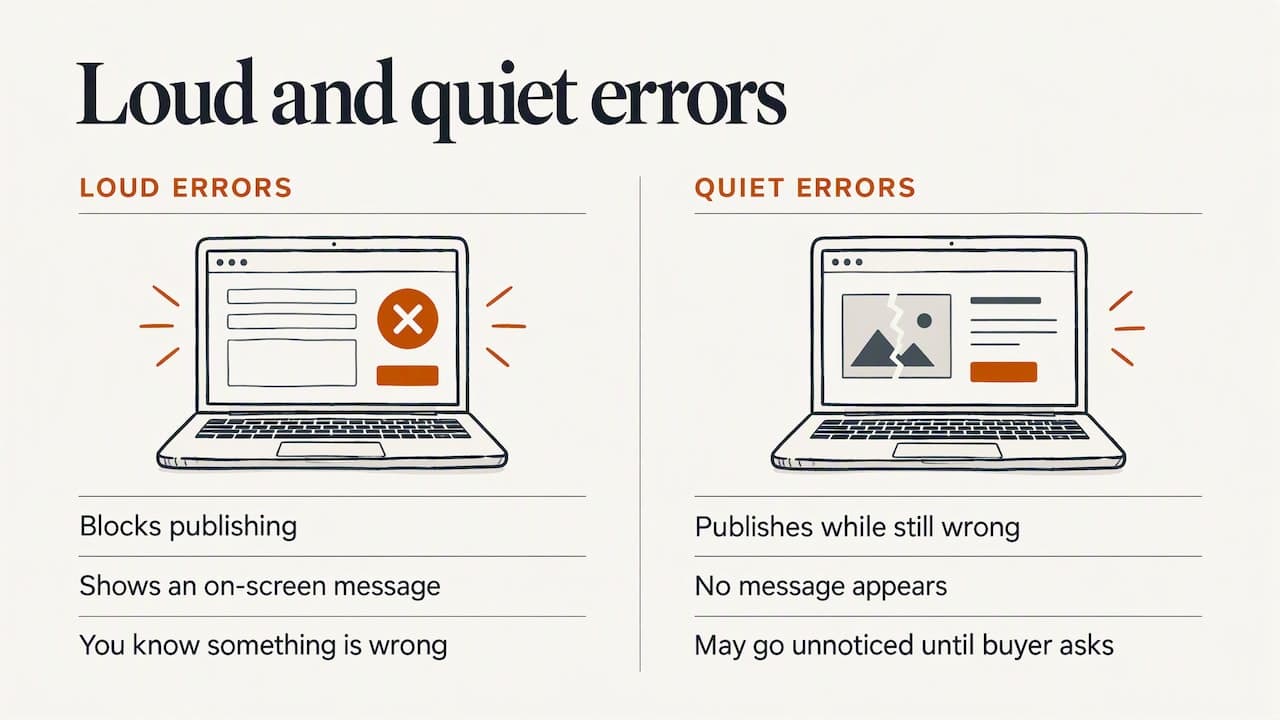
eBay listing errors come in two kinds. The first kind is a message that stops you from publishing, such as error 240 or an invalid category. The second kind is quieter: a typo, a wrong quantity or a missing size that lets the listing go live and then costs you sales. Both are fixable, and most fixes take minutes once you know where to look. This guide decodes the messages, shows you how to correct a live listing, and explains how to catch the quiet mistakes before a buyer does.
TL;DR
- Error 240 means eBay’s filters object to words in your title or description, or to something about the listing or account. Strip the page down to plain text and relist.
- Category, item specific and compatibility errors come from data that does not match what eBay expects for that category. Fix the data, not the wording.
- You can still revise a listing after bids or purchases, but with limits. Use Revise from Selling Activity.
- Silent errors (typos, wrong quantity, broken images, missing sizes) cost more than loud ones, because nothing warns you.
- ShelfSparrow is a done-for-you service that fixes these on the spot: a $297 one-time audit and $29/month ongoing checks.
Table of Contents
- The two kinds of eBay listing errors
- Loud errors: what the common codes mean
- Editing a listing after bids or purchases
- Quiet errors: the ones that cost sales
- A 15-minute check for finding what is wrong
- How to keep errors from coming back
- Perspective
- What your options cost
- Get your listings checked and fixed
- FAQ
- Sources
The two kinds of eBay listing errors
A loud error is a message on screen. You click List, and eBay refuses. These are annoying, but they are honest: you know something is wrong.
A quiet error is a listing that publishes fine and is simply wrong. A title with a misspelled brand. A quantity of 2 when you own one item. A photo link that broke last month. No message appears. You find out when a buyer asks, a sale falls through, or the listing never shows up in search.
Most advice online covers the loud kind. Most lost money comes from the quiet kind. We cover both below.
Loud errors: what the common codes mean
A “listing error code” is just a number eBay attaches to a rule you broke or a field it could not read. The messages are often vague. Here is what the common ones point to, based on eBaymag’s published guide to eBay listing errors.
| Error | What it usually means | First thing to try |
|---|---|---|
| 240 | The item cannot be listed or modified. The title or description may contain improper words, or the listing or seller may violate eBay policy. | Remove unusual words and code from the title and description. |
| 107 | The category is invalid. | Pick a current, specific category again. |
| 21919188 | You exceeded your monthly listing limit. | Check your limits, reduce quantities or contact eBay support. |
| 21919303 | A required item specific is missing. | Fill in every required field for the category. |
The terms in that table, in plain words:
- Category: the shelf on eBay where your item lives, such as “Women’s Coats”. Each category has its own rules.
- Item specifics: the structured fields eBay asks for, like brand, size, color and material. Buyers filter by them.
- Selling limit: the cap on how many items, or how much value, you can list in a month. It is usually lower on newer accounts.
Error 240, the vague one
Error 240 is the one sellers search for most, and eBay’s own wording explains little. One seller on a public forum reported that eBay support told them it typically points to unnecessary page breaks in the listing’s HTML. That is anecdotal, but it fits what we see: the cause is often something invisible.
Work through it in this order:
- Simplify the title. Remove symbols, all-caps shouting, and brand names you are not authorized to use.
- Paste the description into a plain text editor. This strips hidden formatting. HTML is the code behind a formatted description (bold, line breaks, tables). Stray or broken HTML can trip filters.
- Remove contact details and outside links. Phone numbers and links to your own site are a common policy trigger.
- Check the item itself. Is it allowed in this category? Is a brand claim you are making verifiable?
- Look at your account. A policy flag on the seller side can also produce this message, in which case the listing text is not the problem and eBay support is the right next stop.
Invalid category and missing item specifics
These two errors share a root cause: your data does not match eBay’s catalog for that category. Categories get reorganized, and a listing copied from an old one can point at a category that no longer accepts it.
If you used “Sell one like this”, the shortcut that copies an existing listing, check every field after copying. A seller on eBay’s community described listing an item with the wrong title and description details because one important difference was missed after using that feature. Copying saves time and also copies mistakes.
For missing specifics, open the listing form and look for fields marked required. Fill them with the real value, not a placeholder. Wrong values create returns later.
Compatibility errors on parts listings
If you sell auto parts, you list which vehicles a part fits. That list is called compatibility data. According to eBay’s compatibility guide, compatibility must use valid name and value pairs that the category and product data support. Invalid pairs produce an invalid-compatibility error, and a submission with no valid values fails.
The same guide notes that an AddItem call (the request that creates a listing through a tool or integration) fails if an item has more than 3,000 compatible vehicles. If you copy a huge list from another listing and it will not publish, trim it. Two other fixes help: change the eBay category, or reconnect the listing to the right product in eBay’s catalog before pasting compatibility data.
Listing limit errors
Error 21919188 appears when you exceed your monthly cap. Per the eBaymag guide, you resolve it by contacting support or reducing stock quantities. Before you write to support, look at what is counting against you. Active listings count, not just sales, so a pile of old unsold listings can use up your allowance. Ending listings you no longer need is a cheap first move.
Editing a listing after bids or purchases
You found the error after the listing went live. Now there are bids, or someone bought. What can you do?
Per eBay’s revise-a-listing help page, you use Revise from Selling Activity. What you can change depends on the listing format and on whether there are bids, purchases or offers. On a fixed-price listing that has purchases, you can make some changes, but you cannot edit variations. Variations are the options within one listing, such as sizes or colors.
A practical rule: fix what protects the buyer first. If a title or description is materially wrong, correct it and message anyone who already bought. If you can’t make the change, contact the buyer early and offer to cancel or take the item back, rather than hoping nobody notices.
When the item is wrongly described
If a buyer receives something that does not match the listing, the return rules matter. On eBay’s seller returns page, the guidance is that when a purchase is covered by the eBay Money Back Guarantee, you have to accept the return even if your policy says no returns, and accepting means a full refund including original shipping (eBay returns help for sellers). That page is eBay Canada’s. US rules may differ in detail, so check eBay’s US help pages for your account.
The cheapest return is the one that never happens. An accurate listing is the best protection you have.
The wrong quantity mistake
One seller described listing a trading card with a quantity of 2, when they owned one. The buyer bought both. Now the seller has to cancel or find a second card, and cancellations can count against your seller record. Check quantity on every listing, and re-check after any relist or bulk upload.
Quiet errors: the ones that cost sales
These do not trigger a code. They are worth hunting for.
Misspelled titles
Buyers search by keyword. A misspelled brand or joined words (“lethercoat”) can hide your item from the people looking for it. eBay’s help page on finding your listing says a typo that happens to form profanity can keep a listing out of search results, and listings in prohibited categories may be removed (eBay’s guide to finding your listing).
Hidden or incomplete listings
Since July 2026, eBay has said apparel and footwear listings with unclear or missing size or condition details may be hidden until updated, and recommends reviewing them (eBay’s revise-a-listing page). If you sell clothing, check size and condition fields on every active listing, especially older ones.
Broken images
Photos hosted elsewhere can disappear when a link changes or a file is deleted. The listing stays live with a gray box. Buyers skip it. This one rarely announces itself.
Stock that no longer matches reality
If you sell the same item on eBay and your own store, one sale can leave the other channel showing stock you no longer have. That produces oversells, cancellations and unhappy buyers.
A 15-minute check for finding what is wrong
The research behind eBay’s own help page suggests a simple routine. Here it is turned into steps.
- Wait 24 hours after listing. Then open Selling or Seller Hub and confirm the listing is active, not a draft or another status.
- Search for your own item. Use keywords from the listing, the way a buyer would.
- Read the title slowly. Look for misspellings, joined words, odd special characters and accidental profanity.
- Look for duplicate-listing notices and category restrictions.
- Open the listing on a phone. Check images load and the first screen reads clearly.
- Check quantity, price and shipping. Match them to what you have on the shelf.
- Check item specifics. Size, condition and brand should be filled in and correct.
Do this on your top ten sellers first. Then repeat monthly. Done by hand across hundreds of listings, it takes real time, which is why it tends to slide.
How to keep errors from coming back
- Use one template per product type. A tested template beats rebuilding each listing.
- Keep descriptions plain. Less formatting means fewer hidden problems.
- Review after every bulk change. Changing shipping on dozens of listings, for example, is when errors appear. One eBay seller reported listings that threw an error on edit after trying to switch from First Class to Ground Advantage shipping. Spot-check a few after each batch.
- Schedule a standing review. A fixed time every week beats good intentions.
- Write down what you fixed. Patterns show you which step in your process creates the mistakes.
Perspective
Most sellers we talk to are not careless. They are busy. Listings are written once, then the store grows, products change, and nobody has a free afternoon to reread 300 titles.
That is the gap we built ShelfSparrow around. We are a done-for-you service, not software. You do not log into another dashboard and learn another tool. We audit your listings, fix typos and broken images on the spot, and send you a plain-English, prioritized report so you know what changed and what is next.
The loud errors get fixed because they block you. The quiet ones are where we earn our keep. A misspelled title does not send an alert. A stale quantity does not ring a bell. A steady eye catches them, a little order, all day long.
We work on any online store or marketplace, including eBay, Amazon, Walmart and WooCommerce. The goal is simple: a tidy shop that your buyers can trust, and a calmer week for you.
Francis
What your options cost
If you decide you would rather not do the checking yourself, you have several routes. Here is how the field looks, using the prices each provider lists and our own.
| Option | What you get | Price |
|---|---|---|
| ShelfSparrow | Done-for-you audit of titles, SEO, typos and broken images, fixed in 72 hours. Ongoing listing checks, stock alerts and daily summaries. | $297 one-time audit, then $29/month |
| Lydia | AI store management for Shopify and Etsy, audits across 9 categories, report in 48 hours | $497 one-time audit, then $1,997/month |
| Speechify Boost | Audits products and drafts fixes (titles, copy, photos, meta) for you to approve, plus a weekly digest | Not listed here |
| OptraSeven | Shopify CRO agency with a deep audit (CRO means conversion rate optimization: getting more visitors to buy) | $149 as a founding offer against a $297 regular price |
| Focused Developer | Shopify audit, report in 5 business days, money back if fewer than 5 fixes are found | €150 |
| Upwork and Fiverr freelancers | Audits, mostly report-only, no monthly watch | $35 to $1,299 |
| CRO agencies | Tactical audit | $1,500 to $3,000 or more |
A few notes on how to read this.
Lydia is the closest branded rival. At $497 for the audit and $1,997 a month ongoing, it sits at the high end. ShelfSparrow costs $297 for the audit and $29 a month, so we undercut it at both ends.
Speechify Boost drafts fixes and waits for your approval. That is a fair way to work if you want to review everything. We take a different path: ShelfSparrow fixes issues on the spot, so you are not left with a to-do list.
OptraSeven targets brands doing $200k to $5M a year. Its founding-offer audit is priced below our $297, but it is aimed at bigger brands, and it has no $29/month watchdog offering for day-to-day checking.
Focused Developer offers its €150 audit with money back if it finds fewer than 5 fixes. It is a reasonable pick for a one-time Shopify report.
Prediko, Sellbrite and StoreClaw are other names you will meet when comparing store tools. Many are software you operate yourself, which means you still do the fixing. If you want the fixing handled, that is the difference to weigh.
Freelancers on Upwork and Fiverr run from $35 to $1,299, and most deliver a report without any monthly watch. Real CRO agencies charge $1,500 to $3,000 or more for a tactical audit, which is hard to justify for a small shop fixing typos and stock.
Get your listings checked and fixed
If your eBay listings have errors you have not found yet, we will find and fix them. ShelfSparrow is a done-for-you store auditing service, not software. Our $297 one-time store audit covers titles, SEO (the words that help buyers find you in search), typos and broken images, fixed in 72 hours.
After the audit, our $29/month plan keeps a steady eye on your store with listing checks, stock alerts and a short daily summary. We audit any online store or marketplace, including eBay, Amazon, Walmart and WooCommerce. Learn more at ShelfSparrow.
FAQ
What should I do if my eBay item is wrongly described?
Correct the listing through Revise in Selling Activity if eBay still allows the change, and message any buyer who already purchased. If the buyer is covered by the eBay Money Back Guarantee, you must accept the return, and that means a full refund including original shipping, according to eBay Canada’s seller help. Check your own country’s eBay help pages for exact terms.
How do I find misspelled items in my eBay listings?
Wait 24 hours after listing, then open Selling or Seller Hub and confirm the listing is active. Search with keywords from your listing and read the title for misspellings, joined words, accidental profanity and special characters. A done-for-you audit can do this across your whole catalog at once.
What does eBay error 240 mean?
It means the item cannot be listed or modified because the title or description may contain improper words, or the listing or seller may violate eBay policy. Simplify the title, paste the description as plain text, remove contact details and links, and confirm the item is allowed in its category. If it persists, contact eBay support.
Can I edit a listing that already has bids or sales?
Often yes, with limits. Use Revise from Selling Activity. What you can change depends on the format and on bids, purchases and offers. On a fixed-price listing with purchases, you can make some changes but not edit variations.
Sources
- eBay listing errors and how to resolve them (eBaymag Help Center)
- Revise a listing (eBay)
- How to handle a return request as a seller (eBay)
- Finding your listing (eBay)
- eBay compatibility guide (PDF)