
How to Manage Inventory Across Channels Without the Overselling
Managing inventory across channels starts with matching each listing to the same product or variant record and identifying which system controls available quantity. Compare channel, location, reservations, and update timing before changing stock. A shared worksheet makes exceptions visible while keeping each store’s actual inventory rules in control.
To manage inventory across channels, give one system ownership of the stock count. Match every listing to one master SKU, hold back a small buffer on each channel, and check the numbers every day. That is the whole method. The rest of this guide shows you how to set it up, what to check each morning, and how to keep your listings clean so the stock you sync is attached to listings that sell.
A channel is any place you sell: your Shopify store, Etsy, Amazon, eBay, Walmart, a WooCommerce site, or a social shop. Selling on several at once is good for reach. It is hard on stock, because every sale on one channel has to show up on all the others.
TL;DR
- Pick one system to own the stock count. Every channel receives the number and never invents its own.
- Give each product one master SKU (a SKU is the short code that identifies one exact product and variant) and map every listing to it.
- Hold back a small buffer on each channel, bigger for fast sellers and before promotions.
- Spend 15 to 20 minutes each morning checking your top sellers, failed syncs and cancelled orders.
- Keep listings accurate, too. We handle that side for you: a $297 audit and $29/month ongoing checks.
Table of Contents
- What managing inventory across channels actually means
- Step 1: Choose one source of truth
- Step 2: Match every listing to one master SKU
- Step 3: Reserve stock the moment an order lands
- Step 4: Set channel buffers
- Step 5: Roll out one channel at a time
- The daily check that keeps it honest
- What to look for in multichannel inventory software
- How the other options in this space compare
- Stock counts are only half the picture
- Perspective: why we treat this as a watching job
- Put a steady eye on your store
- A one-week plan to get started
- FAQ
- Sources
What managing inventory across channels actually means
Multichannel inventory management means tracking and syncing stock levels across every place you sell from one central system. Shopify describes it as following inventory across retail locations and sales channels, including online marketplaces like Amazon, eBay and Etsy, and social commerce like Instagram and TikTok Shop.
You will also hear the word omnichannel. The difference is simple. In a multichannel setup, channels may keep their own storefronts, checkouts and prices. Zoho explains that when channels run independently, a marketplace sale may not update your store’s stock count on its own. Omnichannel connects the channels more deeply, so inventory and customer data update in real time everywhere. Most small sellers sit in the first camp and aim to get the stock count right. That is a sensible place to start.
Why the problem shows up fast
The trouble starts with a single unit. You have one left. It sells on Etsy at 10:02. Your Shopify store still shows it in stock at 10:05. A second buyer pays. Now you owe someone a refund, an apology and, on some marketplaces, a hit to your seller metrics.
That gap between a sale and the update is where almost every inventory problem lives. Everything below is about shrinking it.
Step 1: Choose one source of truth
The core rule of inventory sync, as Swell puts it, is to keep one system responsible for each number. Treat the quantity a channel shows as a derived value, something that can be recomputed, not something to edit by hand.
In plain words: pick one place where the real count lives. Prim describes this as one platform owning the stock count while channel systems only receive it. Its typical example is an ERP (enterprise resource planning software, the back-office system that runs stock and accounting), where all stock adjustments happen in that one place.
For a small seller, the source of truth might be:
- your Shopify admin, if it is your main store,
- a dedicated inventory tool,
- or a well-kept spreadsheet, if you have a small catalog and low order volume.
The choice matters less than the discipline. Once you pick, nobody edits quantities directly on Etsy, Amazon or anywhere else. Fix the count at the source and let it flow out.
Step 2: Match every listing to one master SKU
Cin7 lists mapping every listing to one master SKU as one of four habits that prevent overselling, alongside real-time sync, small buffers on low-stock items and automated low-stock alerts.
Here is what that looks like in practice. Say you sell a ceramic mug in three colors. Each color gets one master SKU, such as MUG-BLU, MUG-GRN and MUG-WHT. Then the blue mug on Shopify, the blue mug on Etsy and the blue mug on eBay all point to MUG-BLU. If one of those listings uses a different code, or none, your sync tool cannot tell they are the same item.
A short mapping checklist:
- Export your listings from every channel.
- Put them in one sheet, one row per listing.
- Assign the master SKU to each row.
- Flag listings with a missing SKU, a duplicate SKU or a typo in the code.
- Fix those at the source before you turn any sync on.
This is also where messy listings do damage. A product titled one way on Etsy and another on Shopify, or a variant with a blank SKU, is easy to lose track of. We come back to that below.
Step 3: Reserve stock the moment an order lands
Physical stock and sellable stock are not the same thing. ChannelDock separates them and proposes this formula: available-to-sell equals on-hand stock, minus reserved stock, minus unavailable stock, minus safety stock, minus channel holdbacks.
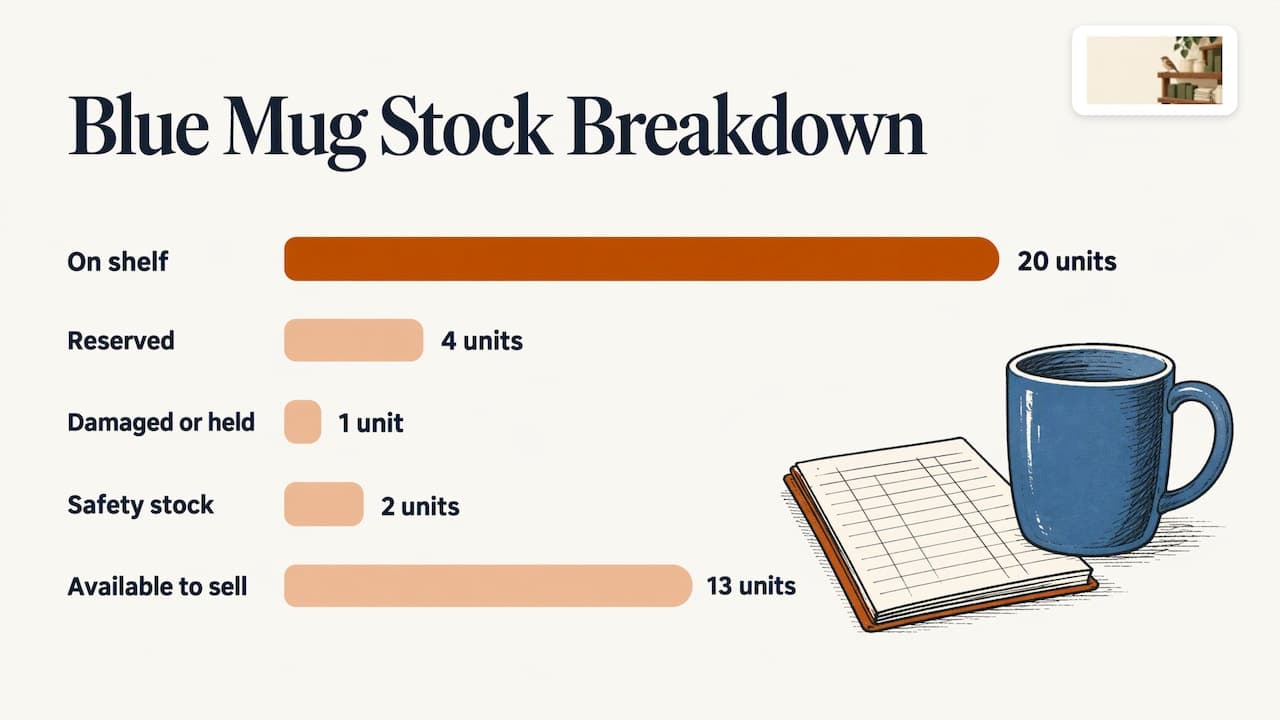
In plain words, “available-to-sell” is the number you actually show buyers. It is what is on your shelf, less what is already promised, damaged or held back.
A worked example for the blue mug:
| Item | Units |
|---|---|
| On the shelf | 20 |
| Reserved (paid, not yet shipped) | 4 |
| Damaged or on hold | 1 |
| Safety stock | 2 |
| Available-to-sell | 13 |
Prim adds a useful habit: reserve stock at order, so a unit leaves available-to-sell as soon as the customer orders, and release it back if the order is canceled. Do not wait for shipping to reduce the count.
Step 4: Set channel buffers
A buffer is a small number of units you hold back from a channel on purpose. If your sync takes a few minutes, a buffer absorbs the sales that happen inside that delay.
Prim advises setting buffers per channel and per product, and raising them before planned promotions to absorb sync delays. Some tools automate this. For example, Stockagile says it uses a minimum threshold per channel to show zero on a channel before you run short.
A simple starting rule for small shops:
- Slow sellers with plenty of stock: no buffer.
- Items with fewer than 10 units: hold back 1 or 2.
- Bestsellers and anything in a promotion: hold back more, and raise it the day before the sale.
These are starting points to tune against your own oversell history, not fixed rules.
Step 5: Roll out one channel at a time
Do not connect everything on day one. Swell recommends starting with one channel in read-only mode, which means the tool looks at the numbers but does not change them. Once you can explain every difference it shows, switch on writes (letting the tool update stock).
A calm rollout looks like this:
- Week one: connect your main store, read-only. Compare its numbers with your source of truth.
- Week two: add your second channel, read-only. Chase down every mismatch.
- Week three: turn on writes for the first channel.
- Week four: turn on writes for the second, then add the next channel.
It is slower than flipping every switch at once. It is also how you avoid a weekend of refunds.
The daily check that keeps it honest
Sync tools are good, but they fail quietly. A connection drops, a variant gets renamed, a marketplace changes a field. That is why a short daily check is worth more than any feature.
One published routine, from Nventory’s reconciliation guide, has you check your top 20 SKUs by seven-day sales first thing in the morning, before fulfillment, in 15 to 20 minutes. In that routine, a mismatch of two units or fewer is corrected and logged. Anything bigger is flagged, and you review the last 48 hours of transactions.
A wider list comes from Digicommerce’s reconciliation workflow. It covers failed inventory updates, negative quantities, marketplace stockouts, orders canceled for lack of stock, stale sync timestamps, buffers on fast sellers, open reservations and returns waiting for inspection.
For a small shop, a practical morning list:
- Failed syncs. Did any update error out overnight?
- Negative or zero counts. Is anything below zero, or at zero but still live somewhere?
- Stale timestamps. Has any channel not updated in an unusually long time?
- Canceled orders. Were any canceled because stock ran out?
- Returns. Are returned items back in available stock, or sitting in a box?
- Top sellers. Do the counts for your top 20 match reality?
Bigger teams add weekly and monthly layers: a weekly review of variance, a monthly look at root causes. Reconciliation (comparing two sets of numbers and explaining the gaps) is usually done daily, weekly or monthly, according to NewStore’s documentation.
What to look for in multichannel inventory software
Most sellers ask about the best multichannel inventory tracking software at this stage. The honest answer is that it depends on your channels, your catalog size and how much fixing you want to do yourself. Use a feature list rather than a brand name to decide.
Mortar’s guide says good software should support:
- a clear system of record,
- real-time sync driven by each transaction,
- stock visibility by location,
- buffers per channel,
- two-way sync (changes flow in both directions),
- and scheduled reconciliation.
Katana adds that you should check how bundles and kits are handled, whether purchase orders are supported, and whether the integrations sync orders, inventory, fulfillment confirmations and returns, not only stock counts.
Before you subscribe to anything, write down:
- Every channel you sell on today, and the two you might add next year.
- Your number of SKUs and variants.
- Whether you sell bundles (for example, a three-mug set built from single mugs).
- Who will look at the tool each morning.
That last question is the one most people skip. A dashboard nobody opens does not protect your stock.
How the other options in this space compare
The field is crowded, and the tools do different jobs. Here is how we see the names sellers ask about. Prices below are as we understand them, and you should confirm current figures on each company’s own site.
| Option | What it is | Where it differs from ShelfSparrow |
|---|---|---|
| Prediko, Sellbrite, StoreClaw | Software for inventory planning and multichannel stock sync | You operate the dashboard and do the fixing yourself |
| Lydia | AI store management for Shopify and Etsy, audits across 9 categories; $497 one-time audit with a report in 48 hours, then $1,997/month ongoing | We charge $297 for the audit and $29/month ongoing |
| Speechify Boost | Audits products and drafts fixes (titles, copy, photos, meta) for you to approve, plus a weekly digest | We fix issues on the spot, with no approval queue |
| OptraSeven | Shopify CRO agency (conversion rate optimization, meaning work that turns more visitors into buyers); deep audit at $149 as a founding offer against a $297 regular price | Aimed at brands doing $200k to $5M a year, with no $29/month watchdog offering |
| Focused Developer | €150 Shopify audit, report in 5 business days | Money back if fewer than 5 fixes are found |
| Upwork and Fiverr freelancers | Audits from $35 to $1,299 | Mostly report-only, with no monthly watch |
| CRO agencies | Tactical audits at $1,500 to $3,000 or more | Built for much larger budgets |
Two things stand out. First, nearly every audit option hands you a report and leaves the work with you. Second, almost none of them keep watching after the audit ends. That gap is where small stores lose sales slowly.
Stock counts are only half the picture
Syncing quantities solves overselling. It does not tell you whether the listing a buyer sees is any good. A typo in a title, a broken image or a missing keyword on one channel means that listing underperforms, even with perfect stock.
Typical leaks we see small sellers face:
- A product photo that no longer loads after a theme or platform change.
- A title that differs between channels, so the same item looks like two products.
- A variant left live at zero stock.
- Descriptions with typos that make a shop look careless.
If you sell on Etsy, our Etsy listing SEO checklist walks through ten fixes that help buyers find you. Search visibility and stock accuracy work together: a listing nobody finds, or one that sells what you do not have, both cost you money.
Perspective: why we treat this as a watching job
Most stock trouble is small and boring. A broken image. A typo in a title. A variant that hit zero on Tuesday and nobody noticed until Friday. None of it is hard to fix. It is easy to miss.
That is why we built ShelfSparrow as a done-for-you service, not software. Most sellers do not need another dashboard to learn. They need someone keeping a steady eye on the store, fixing routine errors as they appear and flagging low stock before it turns into a refund.
Our approach is simple. Start with an audit that finds and fixes what is broken. Then keep watching, all day long, with a short daily summary so you know where things stand. We audit any online store or marketplace, including Amazon, Walmart, eBay and WooCommerce, because your inventory problems do not stop at one channel.
Use whatever sync tool suits your catalog. Then let us keep the listings tidy around it.
Francis
Put a steady eye on your store
ShelfSparrow is a done-for-you store auditing service, not software. Here is what it covers:
- Store audit, $297 one-time. We review titles, SEO, typos and broken images, and fix them in 72 hours. You get a plain-English, prioritized report.
- Ongoing monitoring, $29/month. Listing checks, stock alerts and a daily summary, with routine errors corrected automatically.

If your listings need a clean-up before you sync anything, start with the $297 store audit. If you want the watching to continue after that, see the monthly plan on our homepage.
A one-week plan to get started
You can set up the basics in a week without buying anything new.
- Day 1. List every channel you sell on. Pick your source of truth.
- Day 2. Export every listing. Assign master SKUs.
- Day 3. Fix missing or duplicate SKUs at the source.
- Day 4. Calculate available-to-sell for your top 20 products. Set buffers.
- Day 5. Connect your main channel to your source of truth, read-only if you use a tool.
- Day 6. Run your first morning check using the list above.
- Day 7. Compare notes. Which mismatches repeated? Those are your root causes.
Repeat the morning check daily. After a few weeks it becomes a ten-minute habit, and the surprises get rarer.
FAQ
What is the difference between multichannel and omnichannel inventory?
Multichannel means one shared stock count across separate sales channels, which can keep their own storefronts, checkouts and prices. Omnichannel adds a connected customer experience on top, such as shared carts, loyalty and returns across channels. If you are a small online seller, getting the multichannel basics right comes first.
How do I stop overselling on Etsy, Shopify and Amazon at once?
Use one source of truth, map every listing to one master SKU, and hold a small buffer on each channel. Cin7 also recommends real-time sync and automated low-stock alerts. Reserve stock when the order is placed, not when it ships.
Do I need inventory software to manage several channels?
Not always. With a small catalog and low order volume, a well-kept sheet and a daily check can work. As channels, variants and orders grow, software takes over the repeated updating. Either way, someone still has to review the numbers and keep the listings accurate.
Does ShelfSparrow sync stock between channels?
No. We are a done-for-you service, not software. We audit your listings, fix routine errors such as typos and broken images, send stock alerts and deliver a daily summary. That works alongside whichever system holds your stock count.
How often should I check inventory across channels?
Every morning, before fulfillment, for your fastest sellers. Add a weekly look at differences and a monthly look at why they happen. Our monitoring plan, at $29/month, keeps a watch between your own checks.
Sources
- Shopify: Multichannel Inventory Management guide
- Zoho: Omnichannel vs. Multichannel
- Swell: How to Sync Inventory Across Sales Channels
- Prim: Multichannel inventory management, one stock count
- Cin7: Multichannel Inventory Management, Stop Overselling
- ChannelDock: Multichannel Ecommerce Inventory Management
- Stockagile: Software for omnichannel brands
- Nventory: Inventory Reconciliation SOP for Ecommerce Teams
- Digicommerce: Multi-Marketplace Inventory Reconciliation Guide
- NewStore: Data reconciliation and completeness playbook
- Mortar: How to sync inventory across multiple sales channels
- Katana: Multi-Channel Inventory Software, How to Choose