Stock Level Monitoring: How to Keep Counts Accurate
Stock-level monitoring means reviewing product quantities in the system that controls availability and checking whether those values still match the intended selling context. Track the product, variant, location, and check time together so a count is not mistaken for another channel’s available quantity.
Stock level monitoring means keeping an accurate count of what you can sell right now, and getting a nudge before a product runs out. For a small online store, the routine is simple: know your numbers, set a reorder point for each product, check the counts on a schedule, and get alerts so you are not the one watching a spreadsheet all day. Below, we walk through each step in plain words, then show what it costs to hand the watching to someone else.
TL;DR
- Stock level monitoring is accurate counts, low-stock alerts and clear availability on your listings, so you never sell what you do not have.
- Set a reorder point per product: average daily sales times the days your supplier needs to deliver.
- Compare physical counts to your records on a schedule. Count your best sellers most often.
- Alerts only help if someone acts on them. That is the gap a done-for-you service closes.
- ShelfSparrow is a done-for-you service, not software: a $297 one-time audit and $29/month stock alerts, listing checks and daily summaries.
Table of Contents
- What stock level monitoring actually means
- Why it matters for a small online store
- Step 1: Decide how you will count
- Step 2: Set a baseline with a full count
- Step 3: Set reorder points and safety stock
- Step 4: Set up low-stock alerts
- Step 5: Check records against the shelf on a schedule
- Step 6: Keep every sales channel telling the same story
- Stock levels and listings are one problem
- How the options compare
- Perspective: why we fix instead of flag
- What ShelfSparrow does for your stock and listings
- A simple weekly routine you can run yourself
- Common mistakes to avoid
- FAQ
- Sources
What stock level monitoring actually means
Strip away the jargon and it is three questions. How many of each product do I have? How many do I need before I run out? Does my store show shoppers the truth?
BigCommerce describes the job as keeping accurate counts of products available for purchase, sending low-stock notifications, telling shoppers what is available, adjusting stock automatically and deciding what happens when an item sells out. The payoff is fewer oversold orders and happier shoppers.
A few terms you will see everywhere, in plain words:
- SKU: a code that identifies one exact product version, such as a blue shirt in size medium.
- Inventory level: how many units you hold at a given time. Shopify’s guide counts stock in stores, warehouses and in transit.
- Overselling: taking an order for something you no longer have.
- Stockout: the moment a product hits zero.
- Reorder point: the stock number that tells you it is time to order more.
- Safety stock: an extra cushion held in case demand jumps or a shipment runs late.
- Lead time: the days between placing a supplier order and having the goods in hand.
Why it matters for a small online store
An empty shelf in a physical shop is visible. Online, a sold-out product can sit there looking available, or a product you have plenty of can show as gone because of a typo in a listing. Both cost you sales and trust.
NetSuite says tracking inventory helps reduce stockouts, waste, inefficiency and customer-facing delays while improving forecasting. ShipBob adds that accurate tracking helps prevent overselling and stockouts and guides how much to order as demand and seasons change.
For a one- or two-person store, the real risk is not a lack of tools. It is that checking stock is a chore that slips on busy days. Monitoring only works when it happens every day, including the days you are packing orders, answering messages or on vacation.
Step 1: Decide how you will count
There are two basic approaches. Shopify’s tracking guide tells businesses to choose periodic or perpetual tracking.
- Periodic: you count everything at set times, say the end of each month. Simple, but your numbers go stale between counts.
- Perpetual: your records update with every sale, return and delivery, so the number on screen is always your best current estimate. You still check it against the shelf now and then.
Most online stores use perpetual tracking because the sales platform already records each order. GetApp’s beginner guide lists the spectrum: manual counts, visual checks, software that updates stock when orders arrive, and barcode or RFID systems. RFID simply means tags that can be read by a scanner without line of sight.
If you sell fewer than a few hundred units a month, a clean perpetual record plus a regular physical check is plenty. You do not need a warehouse system.
Step 2: Set a baseline with a full count
Your records are only as good as the day you start them. Shopify recommends a full physical count to set the baseline, counting every unit, setting damaged stock apart and investigating big variances.
A practical way to do it:
- Pick a quiet day and pause new product uploads.
- Count every unit, product by product, and write the number down.
- Put damaged or unsellable items in a separate pile and do not count them as available.
- Enter the counts into your store admin or spreadsheet.
- Note anything that differs a lot from what the system said, and find out why.
Square’s support center shows the same loop in a point-of-sale setting: open stock overview, find the item, inspect the on-hand count, then adjust, pick a reason and save. Choosing a reason, such as damaged, returned or recount, is what lets you spot patterns later.
Step 3: Set reorder points and safety stock
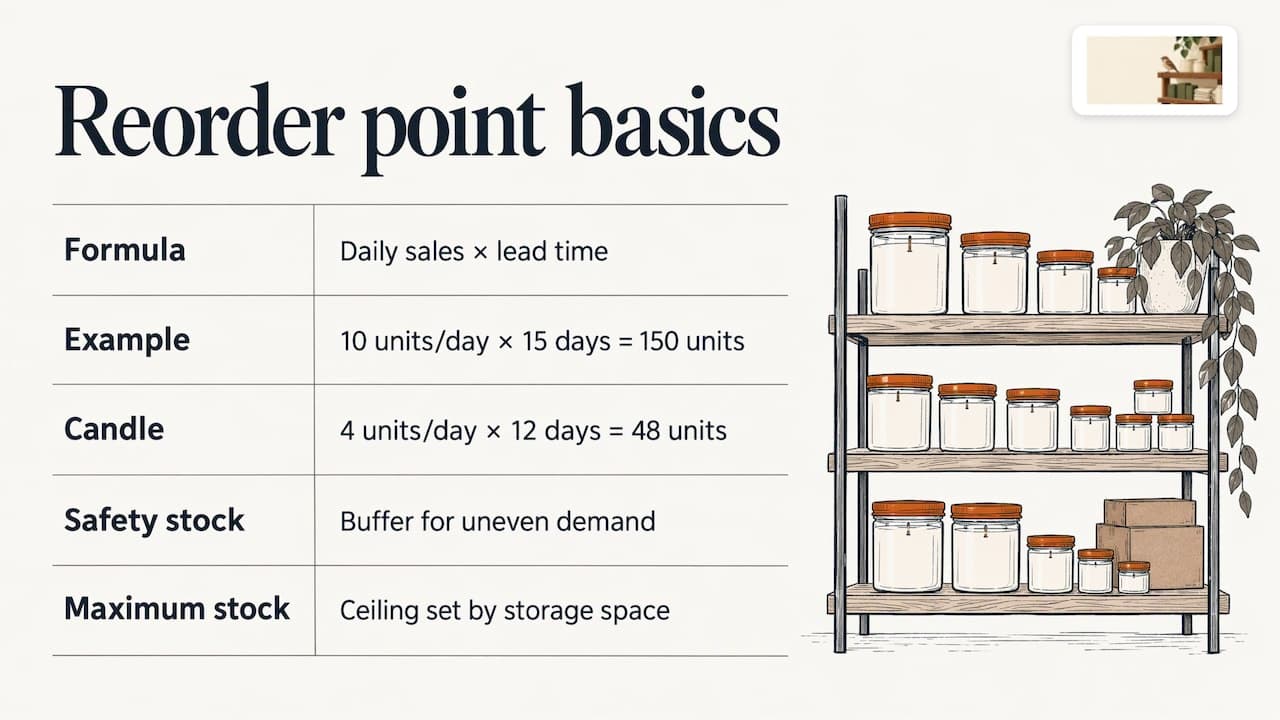
This is the number that turns monitoring into action. Shopify’s formula is average daily sales multiplied by lead time. Its example: 10 units a day times 15 days gives a reorder point of 150 units.
So if a candle sells 4 a day and your supplier takes 12 days, your reorder point is 48. When stock hits 48, you order.
Then add a cushion. Shopify describes safety stock as a buffer, the reorder point as the minimum comfortable quantity, and maximum stock as the ceiling set by your storage space. A cushion makes sense for products with uneven demand or a slow supplier.
GetApp suggests using turnover, sales history and demand forecasts to set reorder points while allowing for peaks and dips. And NetSuite notes that thresholds should be reviewed regularly as demand, supplier reliability and lead times change. Put a reminder on your calendar each quarter, and again before your busy season.
Step 4: Set up low-stock alerts
A low-stock alert is a message that fires when a product drops to a number you chose. Shopify’s inventory guide recommends them and says eligible Shopify Flow workflows can notify staff, tag products, create purchase orders or hide out-of-stock products. Flow is Shopify’s built-in automation tool: you say “when this happens, do that.”
Good alert habits:
- Use the reorder point as the trigger, not zero.
- Send alerts to a place you actually read, like email or a team channel.
- Treat a weekly list of “low” items as a to-do list, not noise.
- Decide in advance what happens at zero: hide the product, show “sold out,” or allow backorders.
The weak point is the person. An alert sent to a busy owner’s inbox on a Friday can sit unread until Monday.
Step 5: Check records against the shelf on a schedule
Even good systems drift. Returns get logged late, a box gets miscounted, a damaged item stays on the books. That is why you compare the record with a physical count.
APQC measures accuracy by comparing physical inventory with the perpetual record and expressing the gap as a percentage. Shopify’s cycle-count guide gives the formula: 1 minus total discrepancy divided by total inventory, times 100. Its example is 148 units counted against 150 recorded, which is 98.7% accurate.
For a benchmark, APQC reports a median accuracy of 95.0%, with a quarter of companies at or below 92.0% and a quarter at or above 98.0%. Shopify’s cycle-count guidance stresses improving the trend and watching for repeated discrepancies over chasing one magic number.
Cycle counting in plain words
A cycle count means counting a few products each week instead of shutting down for a full count. Amazon’s seller guidance suggests auditing at least once or twice a year, with quarterly better, and presents cycle counting as less disruptive than counting everything.
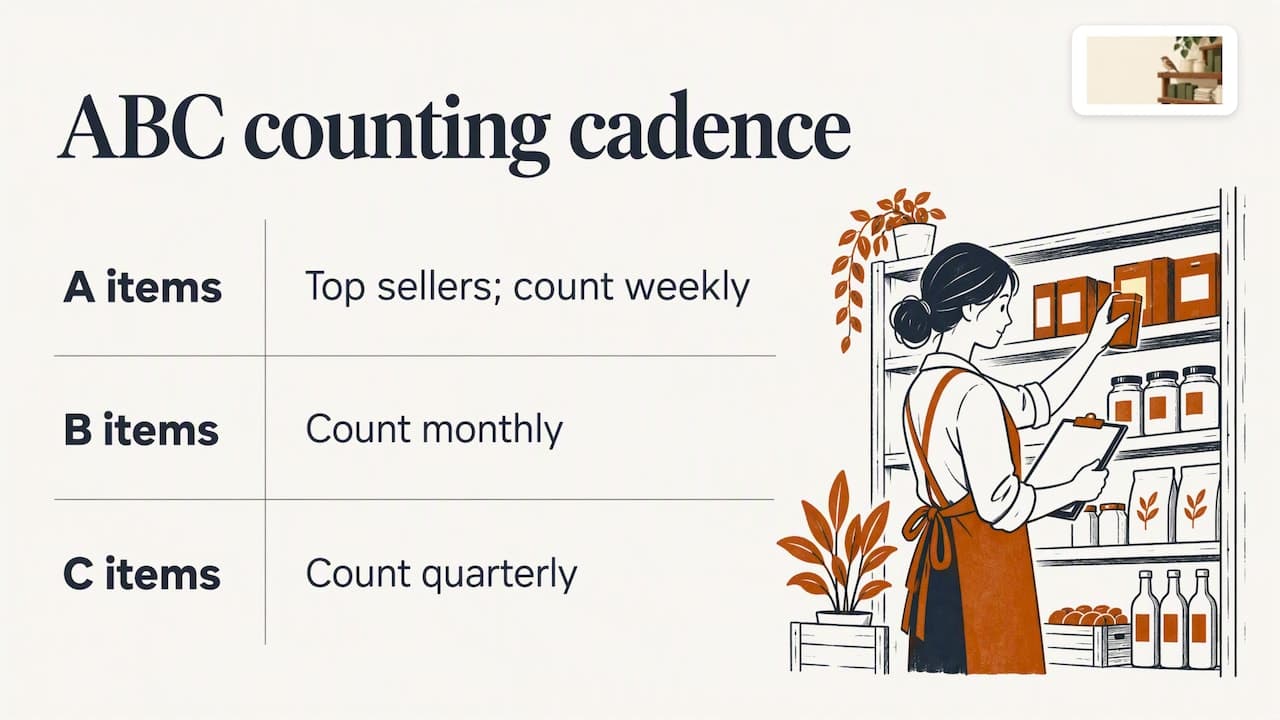
A simple version uses ABC analysis, which sorts products by how much they matter to revenue. Shopify’s example cadence is weekly counts for A items, monthly for B and quarterly for C. Your top sellers are the A items.
When you find a gap, write down the item, the size of the gap, the location, the date and recent receiving, returns or sales, as Shopify advises. Then ask why it happened. Shopify frames this as an audit-to-action loop: the goal is to fix the cause, not just the number.
A government example shows how standard this is. Virginia’s state accounting manual calls for perpetual records, counting goods on receipt, recorded minimum, maximum and reorder quantities, and reconciling counts with the system, with more frequent counts for high-dollar or high-risk items. The same logic works for a candle shop.
Step 6: Keep every sales channel telling the same story
If you sell on your own site and on a marketplace, one sale has to reduce the count everywhere. Shopify recommends a unified view that separates on-hand, available, committed, unavailable and incoming quantities by location. In plain words:
- On hand: physically in your possession.
- Committed: in someone’s cart or order, not yet shipped.
- Available: what you can still sell.
- Unavailable: damaged or on hold.
- Incoming: ordered from a supplier, not yet arrived.
Real-time status tracking helps prevent discrepancies and sales conflicts between channels. If you do this by hand, plan a daily check. It is the step most small sellers skip, and the one that creates oversold orders.
Stock levels and listings are one problem
Here is what we see again and again. Stock problems and listing problems look the same to a shopper. A broken image, a title typo or a wrong variant makes a product hard to find or hard to trust. A quantity showing zero when you have 40 hides it completely.
So monitoring stock without watching the listings leaves half the leak open. A store that is tidy, accurate and in stock is the one that gets the order when a shopper compares two tabs.
How the options compare
You can do all of this yourself, buy software, or hire help. Here is how the field looks for a small seller, using the prices each provider lists.
| Option | What it is | Price as listed | What you still do |
|---|---|---|---|
| ShelfSparrow | Done-for-you audit and ongoing watch | $297 one-time audit, $29/month ongoing | Approve restocks; we fix listing issues |
| Lydia | AI store management for Shopify and Etsy, audits across 9 categories | $497 one-time audit, report in 48 hours, then $1,997/month | Depends on the plan |
| Speechify Boost | Audits products and drafts fixes (titles, copy, photos, meta) for you to approve, plus a weekly digest | Check its site | Review and approve each fix |
| OptraSeven | Shopify CRO agency (conversion rate optimization: turning more visitors into buyers) | Deep audit listed at $149 as a founding offer against a $297 regular price | Aimed at brands doing $200k to $5M a year |
| Focused Developer | Shopify audit, report in 5 business days | €150, money back if fewer than 5 fixes are found | Make the fixes yourself |
| Upwork and Fiverr freelancers | One-off audits | $35 to $1,299, mostly report-only | No monthly watch |
| CRO agencies | Tactical audits | $1,500 to $3,000 or more | Varies |
Software tools like Prediko, Sellbrite and StoreClaw sit in a different lane: they give you a dashboard and you do the work. That suits teams with someone who enjoys dashboards. It does not suit a founder who wants leaks fixed and a short note at the end of the day.
How to choose
- You want to learn the numbers yourself: follow the steps above and use your platform’s built-in alerts.
- You want a report you will act on: an audit from a freelancer or a focused shop works, if you have the hours to do the fixes.
- You want the fixing and the watching handled: pick a service that changes things on the spot and keeps checking afterward.
- You do over $200k a year and want conversion strategy: an agency lane such as OptraSeven’s is built for that.
Perspective: why we fix instead of flag
Most store owners do not lack information. They lack time. A report that lists 60 problems is one more chore, and a dashboard is one more login.
That is why ShelfSparrow is a done-for-you service, not software. We keep a steady eye on your listings and stock all day long. Typos and broken images get fixed on the spot. Low stock gets flagged before it costs you a sale. You get one plain-English daily summary instead of a pile of alerts.
Approval-based tools have their place, but every draft waiting for sign-off is a leak that stays open. We would rather fix the small things now and keep your attention for the decisions that are yours: what to stock, what to price, who to order from.
And we do not think watching your store should cost $1,997 a month. A tidy shop, kept tidy, should be within reach of a small seller.
Francis
What ShelfSparrow does for your stock and listings
ShelfSparrow audits any online store or marketplace, including Amazon, Walmart, eBay and WooCommerce, as well as Shopify and Etsy. Here is what is on offer:
- Store audit, $297 one-time: a listing audit covering titles, SEO (the words that help shoppers find you in search), typos and broken images, with fixes made in 72 hours. You get a prioritized report in plain English.
- Ongoing watch, $29/month: listing checks, stock alerts and a daily summary, so small problems get caught and low stock is flagged before it becomes a stockout.
So against the field: $297 for the audit versus $497 at Lydia, and $29/month versus $1,997/month. Against Speechify Boost, we fix issues on the spot rather than waiting for approval. OptraSeven lists a $149 founding offer against its $297 regular price, but it targets brands doing $200k to $5M a year and has no $29/month watchdog. Focused Developer’s €150 audit comes with a report in 5 business days and a money-back promise if it finds fewer than 5 fixes; the fixing stays with you.
Start with the store audit to see where your leaks are, or read more on the ShelfSparrow site.
A simple weekly routine you can run yourself
Whether or not you hire help, this rhythm keeps stock honest:
- Daily, five minutes: scan low-stock alerts and anything showing zero. Confirm it is really zero.
- Weekly, thirty minutes: cycle count your top sellers and compare with the record. Write down gaps.
- Monthly: count the middle tier, review returns, and check that every channel shows the same numbers.
- Quarterly: recalculate reorder points using recent sales and your supplier’s real delivery times. Count the slow movers.
- Before busy season: raise safety stock on your best sellers and ask suppliers for current lead times.
Zoho’s guide notes that updated stock data helps businesses replenish before items run out. The routine above is how you keep that data updated without a warehouse team.
Common mistakes to avoid
- Alerting at zero. By then it is too late. Alert at the reorder point.
- Never reviewing reorder points. Demand and lead times move.
- Ignoring returns. A return not logged is a phantom unit or a missing one.
- Counting damaged stock as available. Keep it separate.
- Fixing the number but not the cause. If the same product drifts every month, find out why.
- Watching stock but not listings. A broken image or wrong variant loses sales even when the shelf is full.
FAQ
How can stock levels be monitored?
Track every sale, return and delivery in one record, then compare that record with a physical count on a schedule. Add low-stock alerts set at each product’s reorder point. Your sales platform probably already does the first part, so the schedule and the alerts are where your effort goes.
What is the procedure for checking stock levels?
List the products to check, count them physically, and enter the real quantities. Review the differences against your records, pick a reason for each adjustment, and save. Square’s help center walks through this flow, and a stocktake works the same way in most systems.
How do I monitor inventory levels across several marketplaces?
Use one master count and make sure every sale on any channel reduces it. Separate on-hand from available and committed stock so you do not promise units that are already in someone’s order. If your channels do not sync, plan a daily check, or have a service watch them for you.
How often should I count stock?
There is no single rule. Amazon’s guidance suggests at least one or two audits a year, with quarterly better, and cycle counts in between. A common pattern is weekly for best sellers, monthly for the middle tier and quarterly for slow movers.
Is ShelfSparrow software I have to learn?
No. It is a done-for-you service. We audit and fix your listings, keep watching them, flag low stock and send a daily summary. The audit is $297 one-time and the ongoing watch is $29/month.
Sources
- BigCommerce: Inventory Tracking
- Shopify: What Are Inventory Levels?
- NetSuite: What Is Inventory Tracking?
- ShipBob: Inventory Tracking guide
- Shopify: Inventory Tracking, a 5-Step Guide
- GetApp: How To Keep Track of Inventory
- Square Support Center: View, receive, and adjust inventory
- Shopify: Inventory Management
- APQC: How Do You Measure Inventory Accuracy?
- Shopify: Cycle Counting
- Amazon: Inventory management techniques and best practices
- Virginia Department of Accounts: CAPP Manual 30515
- Shopify: Inventory Status
- Zoho Inventory: What is Inventory Tracking?