How to Prevent Overselling in Your Online Store

Overselling means taking orders for items you can’t ship. The fix is simple to say: keep one trusted stock count, keep every channel matched to it, hold back a small buffer on fast sellers, and get warned before a product hits zero. Doing that by hand every day is where small stores slip. That is the gap ShelfSparrow fills: our $29/month plan runs listing checks, stock alerts and a daily summary, so a low count reaches you while you can still act.
This guide explains why overselling happens, what to set up on your platform, and what to do when an order slips through anyway.
TL;DR
- Overselling happens when the stock number your shop shows is different from what is on your shelf. Delayed updates, several sales channels and manual edits are the usual causes.
- Five habits fix most of it: one source of truth, fast syncing, a safety buffer, a clear stock rule per channel, and a monthly check of stock-related cancellations.
- Set a low-stock alert at roughly 2 to 3 days of average sales so you reorder or pause a listing before it sells out.
- If an order is oversold, tell the buyer fast, refund, and fix the cause so it doesn’t repeat.
- ShelfSparrow is a done-for-you service, not software: $29/month for listing checks, stock alerts and daily summaries, and a $297 one-time audit.
Table of Contents
- What overselling is, in plain words
- Why it happens
- Five fixes that prevent overselling
- Platform settings that help
- Set a low-stock alert that is actually useful
- Keep listings accurate, not just counts
- Where ShelfSparrow fits
- The alternatives, and how they compare
- What to do when an item is oversold anyway
- Your first-week plan
- Get the checking taken off your plate
- Our view: overselling is a small-attention problem
- FAQ
- Sources
What overselling is, in plain words
Overselling is selling more units than you actually have. One definition describes it as a result of inaccurate inventory data, reservations or channel updates. In everyday terms: your store says “3 in stock,” but you really have 0.
It costs you more than one sale. You refund, apologize, and sometimes lose the customer. On marketplaces, canceled orders can also hurt your seller standing, so check each marketplace’s seller metrics page for its cancellation rules.
Why it happens
The same few causes show up again and again. According to the Racklify overview, the typical culprits are:
- Outdated counts. Someone received stock or counted a shelf and never updated the store.
- Sync delay. “Sync” means two systems, such as your Shopify store and your Etsy shop, sharing the same stock number. If the update takes minutes or hours, two buyers can purchase the last unit on different channels.
- Manual overrides. A quick edit to a quantity that nobody wrote down.
- Returns not restocked. Or restocked too late, so the number is wrong in the meantime.
- Wrong safety-stock settings. Safety stock is a small quantity you keep unsold as a cushion. Set it too low and the cushion does nothing.
The risk grows when the same product is listed on several channels. A store selling on Shopify, Etsy, Amazon, Walmart, eBay or WooCommerce has more places where a number can go stale.
Five fixes that prevent overselling
A multichannel inventory guide lays out five fixes in order. Here they are for a small store.
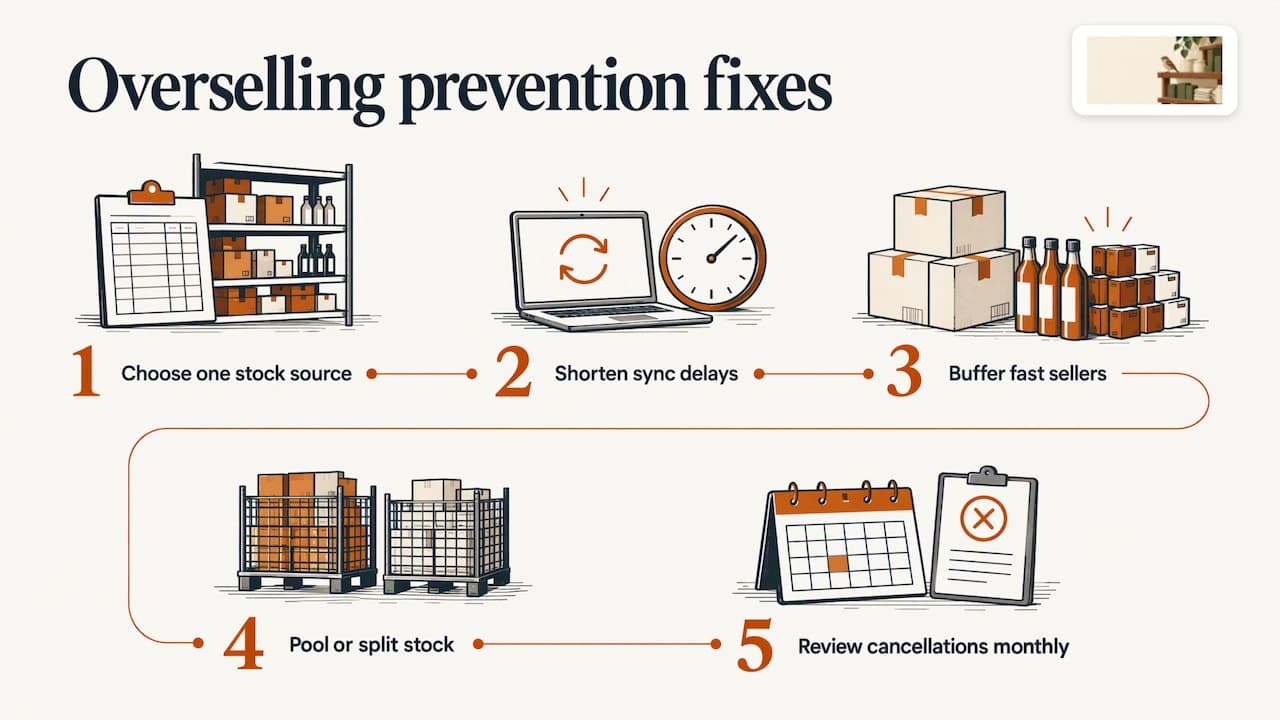
1. Pick one source of truth
Decide where the real stock number lives: your platform’s inventory page, a spreadsheet, or a warehouse system. Every other place copies from it. When two places can both be edited freely, they will eventually disagree.
Write the rule down for your team: “Stock changes only here.” It sounds small. It prevents most mystery discrepancies.
2. Shorten the sync delay
If you sell on more than one channel, update stock as close to instant as your tools allow. Event-based updates, which fire the moment a sale happens, beat updates that run on a timer. A supply chain blog describes the larger-company version: one stock authority that publishes sellable numbers to each channel, with alerts when a feed goes stale and a daily reconciliation, meaning a check that counts match.
You don’t need an enterprise setup. You do need to know how often your channels update, and what happens in between.
3. Buffer your fast sellers
A buffer means showing fewer units online than you hold. If you have 10 and show 8, a late sync or a miscount costs you nothing. Apply it to the products that move fastest, since that is where sync gaps bite.
4. Choose pooled or split stock
With pooled stock, every channel sells from one shared count. With allocated stock, you assign a fixed number to each channel (say, 6 to Shopify and 4 to Etsy). Pooled is simpler to read. Allocated is safer if your sync is slow, because one channel can’t drain the other. Pick one per product and stick to it.
5. Track stock-related cancellations monthly
Once a month, list every order you canceled or delayed because of stock. Note the product and the channel. If the same SKU (your internal product code) shows up twice, that product needs a bigger buffer, a faster reorder, or a cleaner sync.
Platform settings that help
Most platforms have built-in controls. Check them first.
BigCommerce’s documentation is a good example of what to look for. It lets you adjust stock when an order is placed or fulfilled, restore stock automatically on refunds and cancellations, set a safety-stock quantity that can’t be bought online, and send low-stock and out-of-stock emails. Stock is also held temporarily during checkout and returned if payment fails.
On Shopify, the setting to know is “Continue selling when out of stock.” With inventory tracking on, it lets customers keep checking out at zero, so stock can go negative. That’s right for preorders. For items you can’t backorder, switch it off.
Whatever your platform, confirm four things:
- Quantity tracking is on for every product and variant (a variant is a version, like size or color).
- The “keep selling at zero” option is off unless you mean to take backorders.
- Refunds and cancellations return stock the way you expect.
- Low-stock emails go to someone who reads them.
Set a low-stock alert that is actually useful
An alert at 1 unit is too late. An alert at 50 is noise. A Shopify inventory guide suggests a safety stock of 2 to 3 days of average sales per product. Its example: sell 5 units a day, hold a 15-unit buffer and trigger the reorder alert there.
Try it on three products this week:
| Product | Average daily sales | Alert at (3 days) |
|---|---|---|
| Best seller | 5 units | 15 units |
| Steady seller | 2 units | 6 units |
| Slow seller | 0.5 units | 2 units (round up) |
If your supplier takes two weeks to deliver, raise the number to cover that wait. For a longer walkthrough, see our guides on setting low-stock alert thresholds and low stock alerts.
Keep listings accurate, not just counts
Stock numbers are half the story. Overselling also comes from listings that don’t match reality: a variant that should be marked sold out and isn’t, a bundle that still shows availability after one part ran out, a product copied to a second channel with an old quantity.
A short weekly routine catches most of it:
- Open your best 10 products on each channel and compare the shown stock with your source of truth.
- Look for variants showing stock when the base item is at zero.
- Check for duplicate listings of the same item.
- Review anything edited by hand in the last week.
Our guide on checking product availability against inventory walks through the comparison in more detail, and managing inventory across channels covers the multichannel side.
This is also the work most owners skip when the week gets busy. That’s normal. It is steady, repetitive checking, and it is exactly what a done-for-you service is built to take over.
Where ShelfSparrow fits
ShelfSparrow is a done-for-you store service, not software. There is no new dashboard to learn. We audit any online store or marketplace, including Shopify, Etsy, Amazon, Walmart, eBay and WooCommerce, and our plans cover two jobs.
- $297 one-time listing audit. We review titles, SEO, typos and broken images, and fix them within 72 hours. You get a plain-English, prioritized report of what we found.
- $29/month ongoing watch. Listing checks, stock alerts and a daily summary. Our monitoring runs 24/7 and corrects routine listing errors automatically. Low-stock situations are flagged so you can reorder or pause a listing before it sells out.
The daily summary matters most for overselling. Instead of discovering a zero-stock listing from an angry email, you see it in one short note each day.
The alternatives, and how they compare
You’ll meet several kinds of providers while researching. Here is how they differ from ours, using the prices and terms each one publishes.
| Option | Type | What you get | Price |
|---|---|---|---|
| ShelfSparrow | Done-for-you service | Audit with fixes in 72 hours, then listing checks, stock alerts and daily summaries | $297 one-time, then $29/month |
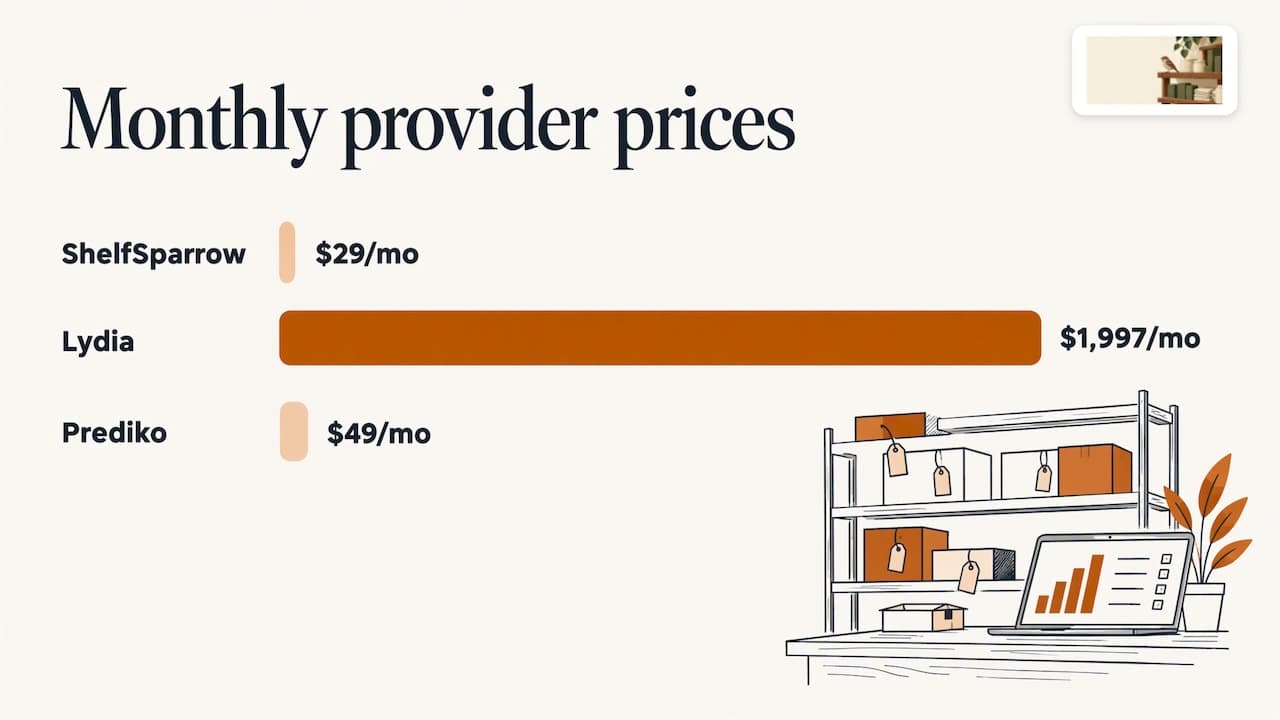
| Lydia | AI store management for Shopify and Etsy | Audit across 9 categories, report in 48 hours | $497 one-time, then $1,997/month |
| Speechify Boost | Audit tool | Audits products and drafts fixes (titles, copy, photos, meta) for you to approve, plus a weekly digest | See its site |
| OptraSeven | Shopify conversion-rate agency | Deep audit, aimed at brands doing $200k to $5M a year | $149 founding offer against a $297 regular price |
| Focused Developer | Shopify audit | Report in 5 business days, money back if fewer than 5 fixes are found | €150 |
| Upwork and Fiverr freelancers | Marketplace freelancers | Mostly report-only, no monthly watch | $35 to $1,299 |
| Conversion-rate agencies | Agencies | Full optimization work | $1,500 to $3,000 or more |
A few notes on reading this table.
Lydia charges $497 for the audit and $1,997 a month after that. Our audit is $297 and our ongoing plan is $29 a month.
Speechify Boost drafts fixes and waits for you to approve them. We fix issues on the spot, so a typo or a broken image doesn’t sit in a queue.
OptraSeven is built for larger brands and has no $29/month watchdog offering. A store selling a few dozen products isn’t its target.
Freelancers and agencies can be useful for design or strategy work. A freelance audit is usually a document handed over once, with no one watching afterward.
A word on Prediko, Sellbrite and StoreClaw. These are inventory and multichannel tools you operate yourself. Prediko starts at $49 a month and still leaves the fixing to you. If you want the work done rather than another system to configure, a done-for-you service is the lighter path. For a fuller breakdown, read our comparison of inventory monitoring services.
What to do when an item is oversold anyway
Even careful stores get one now and then. Handle it in this order:
- Stop the leak. Set the product to sold out on every channel right away, so no one else orders it.
- Tell the buyer quickly. Say what happened and offer a refund, or a restock date if the wait is short. Silence is what turns a small miss into a bad review.
- Cancel and refund. Use the platform’s own cancel-and-refund flow so stock and payment records stay clean.
- Find the cause. Was it a sync delay, a manual edit, a return that wasn’t restocked? Write it in your monthly cancellation list.
- Change one thing. A bigger buffer, a tighter sync, or an earlier alert. One fix per incident is enough.
Your first-week plan
- Day 1: Choose your source of truth and tell everyone who edits stock.
- Day 2: Turn on quantity tracking and low-stock emails everywhere you sell.
- Day 3: Set a 2 to 3 day alert on your top 10 products.
- Day 4: Add a buffer to your fastest sellers.
- Day 5: Compare listings against the real counts on each channel.
- Day 6 and 7: Start the monthly cancellation list. Review it in 30 days.
If you’d like a seasonal angle, our guide to reviewing inventory before a demand change helps you prepare for peaks, and preventing stockouts covers the other side of the same problem.
Get the checking taken off your plate
Start with a store audit: $297 one-time. We fix titles, SEO, typos and broken images within 72 hours and send a plain-English, prioritized report. Then keep a steady eye on your store with the $29/month plan: listing checks, stock alerts and a daily summary. You can see everything on the ShelfSparrow home page, and the Shopify and Etsy listing audit page covers those two platforms.
The audit is the quickest way to find out which listings are quietly costing you orders. The monthly plan keeps them from drifting back.
Our view: overselling is a small-attention problem
Most overselling isn’t a technology failure. It’s a attention failure. Nobody is careless on purpose. The week fills up, a count goes stale, and a listing keeps promising what the shelf can’t deliver.
We built ShelfSparrow around that. A small store doesn’t need another dashboard to learn. It needs someone keeping a steady eye on the listings, fixing the small errors as they appear, and saying so in one calm daily note. A little order, all day long.
That’s why we combine a one-time audit with a low monthly watch. The audit clears the backlog of typos, broken images and weak titles. The $29/month plan keeps stock alerts and listing checks running, so the clean store stays clean.
If you do one thing after reading this, set alerts at 2 to 3 days of sales on your best sellers. If you’d rather hand it off, we’re here.
Francis
FAQ
What does overselling mean in ecommerce?
It means accepting orders for more units than you can ship. It usually comes from stock counts that are out of date, slow updates between sales channels, or manual edits. The buyer pays for something you don’t have, and you must cancel and refund.
How much safety stock should I keep?
A common starting point is 2 to 3 days of average sales for each product. If you sell 5 a day, that is 15 units. Lengthen it if your supplier is slow, and review it after each month’s cancellation list.
Can I prevent overselling without software?
Yes, for a small store. Pick one source of truth, turn on stock tracking and low-stock emails, hold a buffer on fast sellers, and check listings weekly. ShelfSparrow does that checking for you as a service: $29/month for listing checks, stock alerts and daily summaries.
Does ShelfSparrow work with Amazon, Walmart, eBay and WooCommerce?
Yes. We audit any online store or marketplace, including Shopify, Etsy, Amazon, Walmart, eBay and WooCommerce. The one-time audit is $297, with fixes completed in 72 hours.
What is the difference between overselling and a stockout?
A stockout is when you run out of an item and the listing correctly shows it as unavailable. Overselling is when the listing still says it’s available and takes the order. Stock alerts help with both.
Sources
- What Is Overselling in eCommerce? | Racklify
- Overselling Across Sales Channels: How to Keep Inventory in Sync
- How to Stop Overselling Across Every Sales Channel You Use
- Inventory Tracking | BigCommerce Support
- Shopify POS Inventory Sync Online and In-Store (2026 Guide)
- Continue Selling When Out of Stock on Shopify