How to Prevent Inventory Stockouts in a Small Online Store
You prevent stockouts by knowing three numbers for every product: how fast it sells, how long a reorder takes to arrive, and how much cushion you keep for surprises. Then you set an alert that fires while you still have time to act. Everything else in this guide is how to get those numbers right and keep them right.
A stockout simply means a product you sell has hit zero units. The customer who wanted it leaves, or worse, buys it and you cannot ship it. Small stores feel this hardest because one popular item can carry a big share of revenue.
TL;DR
- Work out a reorder point for each top seller: daily sales times supplier lead time, plus a cushion of extra units (safety stock).
- Make sure every sales channel sees the same stock number. Fast syncing alone does not stop overselling.
- Set low-stock alerts at the level that covers the units you will sell before a reorder lands, not at a round number.
- When an alert arrives, check the count, reorder, and pause or adjust the listing the same day.
- A done-for-you service can watch listings and stock around the clock so the alert is never the thing you miss.
Table of Contents
- Why stockouts happen in small online stores
- Step 1: Get your inventory counts right
- Step 2: Know your sales speed and your supplier’s lead time
- Step 3: Set safety stock and reorder points
- Step 4: Keep every sales channel on the same number
- Step 5: Set low-stock alerts that give you time to act
- Step 6: What to do when a low-stock alert arrives
- Step 7: Plan for late suppliers and sudden demand
- How the main options for stockout prevention compare
- Our perspective: a tidy store beats a clever dashboard
- Let us keep watch while you run the store
- Quick checklist you can use this week
- FAQ
- Sources
Why stockouts happen in small online stores
Most stockouts are not one big mistake. They are a pile of small gaps that line up.
According to MyTotalRetail, overselling (selling units you do not have) comes from demand spikes you did not see coming and ones you could have predicted, slow or infrequent inventory syncs, and too little safety stock. Poor forecasting and the hassle of tracking stock across several marketplaces make each of those worse. The same article notes that nearly 70 percent of shoppers say their opinion of a business drops when an item is out of stock after being shown as available online.
That last point matters more than the lost sale. A shopper who is told “in stock” and then gets a cancellation email remembers it.
On the supply side, Portless describes stockouts in ecommerce as the result of long lead times, fragile forecasts, and decisions made too far ahead of real demand. Its list of causes includes inaccurate demand forecasting, long replenishment times (60 to 90 days for ocean freight plus warehouse receiving), inventory counts that disagree across channels, tight cash, and supplier or quality-control delays.
Put plainly, four things drive most stockouts for a small seller:
- Wrong counts. The number in your store does not match the shelf.
- Slow restocking. Your supplier takes longer than you planned for.
- Sudden demand. A promotion, a mention, or a season sends sales up faster than expected.
- Split channels. You sell the same item on two or more platforms and each one tracks its own number.
The rest of this guide goes after each one.
Step 1: Get your inventory counts right
Every prevention method depends on the count being true. If your system says 12 and the shelf holds 7, no formula will save you.
A few habits keep counts honest:
- Count your fastest sellers on a schedule. A cycle count just means counting a small group of products on a rotating basis instead of shutting down for one giant count. Pick your top 10 sellers and count them weekly. Count the rest monthly or quarterly.
- Record damaged, returned, and sample units right away. Units that leave the shelf without a sale are the usual source of drift.
- Use one source of truth. Pick one place (your store platform or a spreadsheet) as the master count, and let everything else follow it.
- Check that your listings match your stock. A product marked “in stock” with zero units, or a variant that was never set up, creates the same customer problem as a true stockout. Our guide on how to check product availability against inventory walks through this check.
Step 2: Know your sales speed and your supplier’s lead time
Two plain numbers do most of the work.
Daily sales rate is how many units of a product you sell per day, on average. Use the last 30 to 90 days, and adjust if a promotion or a slow stretch skews it.
Lead time is the number of days between placing a reorder and having the units ready to ship. Count the full trip: supplier production, shipping, and the time it takes you to receive and shelve the goods. If a supplier says “two weeks” but your last three orders took three, plan on three.
A worked example
These numbers are made up to show the math.
- You sell a ceramic mug at 6 units a day.
- Your supplier takes 14 days to deliver after you order.
- Demand during lead time: 6 × 14 = 84 units.
If you reorder with exactly 84 units left and everything goes to plan, you run out on the day the shipment arrives. Any delay or sales bump and you are out of stock. That is why you add a cushion.
Step 3: Set safety stock and reorder points
Safety stock is extra inventory you hold on purpose, to absorb a late shipment or a sales spike. Reorder point is the stock level at which you place a new order.
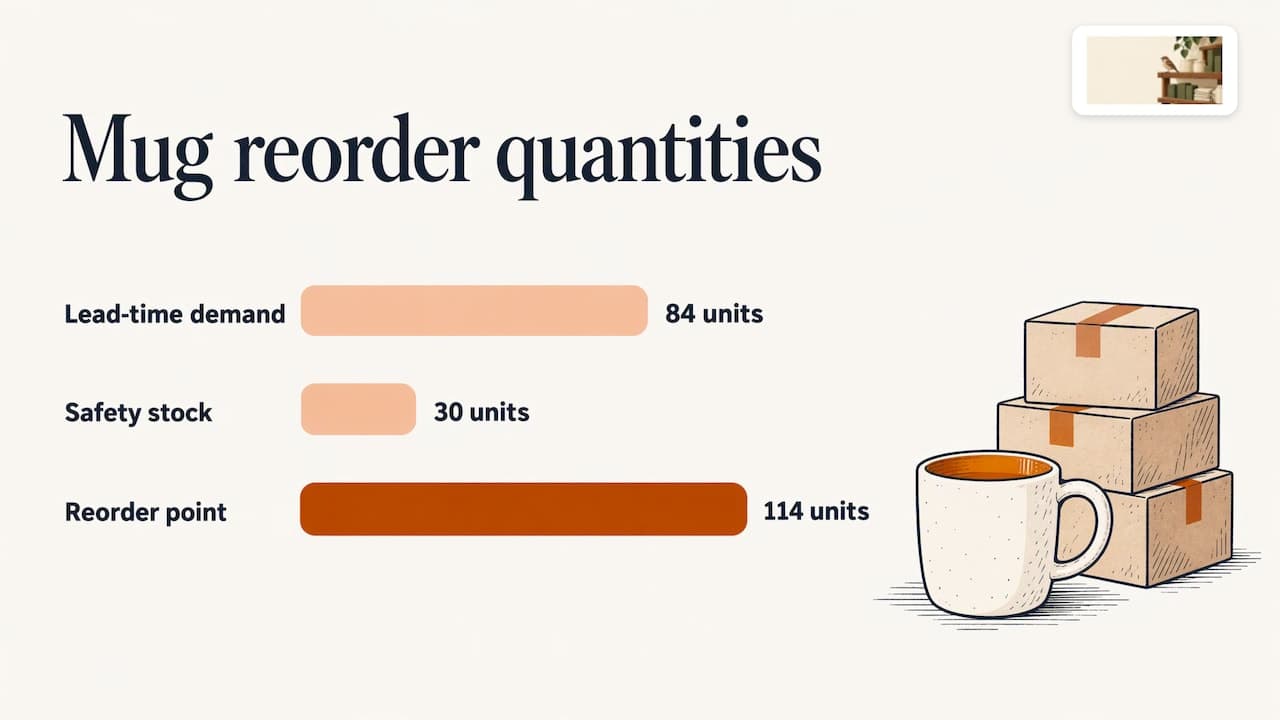
The simple formula:
Reorder point = (daily sales × lead time) + safety stock
Continuing the mug example, say you decide on 5 days of cover as safety stock: 6 × 5 = 30 units.
- Reorder point = 84 + 30 = 114 units
When the count drops to 114, you order. If the supplier is on time, the extra 30 units sit on the shelf as a buffer. If the supplier is a week late, they are what keeps your listing live.
How big should the cushion be? There is no universal answer. A practical way to choose:
| Situation | Cushion to consider |
|---|---|
| Steady seller, reliable supplier | Smaller buffer, a few days of sales |
| Seasonal or promoted item | Larger buffer, plus an earlier order date |
| Supplier with a history of delays | Add the typical delay to your lead time |
| Slow, low-cost item | Little or none; a short stockout costs you less |
Review reorder points every quarter, and sooner after a big change in sales. A reorder point built on last spring’s sales will not fit your holiday season.
Step 4: Keep every sales channel on the same number
Selling the same product on Shopify, Etsy, Amazon, Walmart, eBay, or WooCommerce multiplies the risk. Each platform can show a different count, and the last sale on one may not reach the others in time.
Logi Frontier makes a point worth remembering in its guide to multi-channel inventory sync: the goal is not syncing faster, it is making sure every platform sees the same number. Its definition of available stock is units on hand, minus units already sold but not yet shipped, minus safety stock. If your channels define “available” differently, syncing every minute will still oversell.
In practice:
- Decide what “available” means and apply it everywhere. Most stores should subtract units that are sold but not shipped.
- Hold back a few units from the marketplace that moves fastest, so a rush on one channel does not drain the others.
- Spot-check one product across all channels each week. If the numbers differ, find out why before it costs you a sale.
If you are comparing tools for this, our roundup of Sellbrite alternatives for small sellers lays out the options.
Step 5: Set low-stock alerts that give you time to act
An inventory alert is a message sent when stock falls below a level you choose. It turns “I should check on that” into a notification you cannot miss.
Here is how alerts typically work, using Merch’s inventory alert documentation as an example:
- Each product has a low-stock threshold, the number that triggers the warning. New products start with a default baseline.
- The low-stock alert fires the first time available stock drops under that threshold.
- An out-of-stock alert fires the moment available stock hits zero.
- The same alert is not sent again until the product climbs back above the threshold and then drops below it once more.
That last rule is useful to know. If you get one alert and ignore it, you will not get a second reminder. The alert is a single tap on the shoulder, so act on it.
What level should trigger an alert?
Merch recommends a threshold that covers the units you expect to ship between now and the day a reorder would arrive. That is the same logic as the reorder point above. For the mug, an alert at 114 units gives you the full lead time plus your cushion.
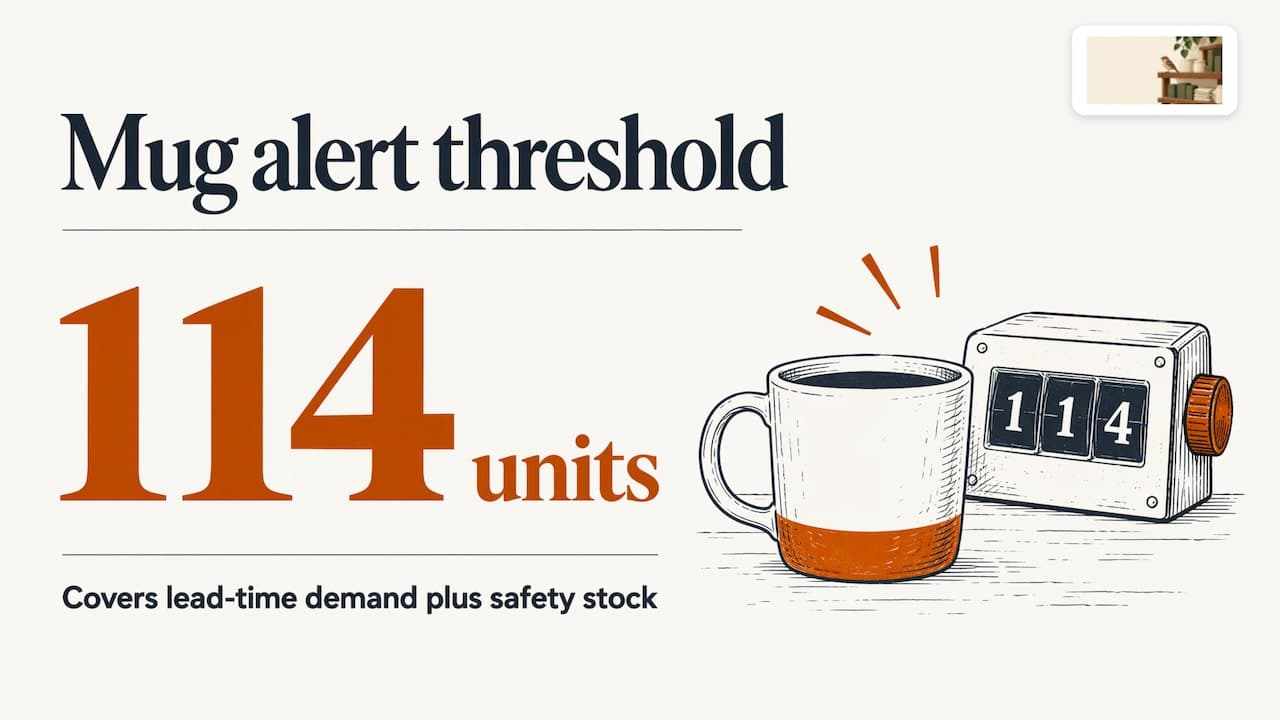
Avoid setting every alert at “5 units” or “10 units.” A fast seller with a long lead time is out before a 10-unit alert can help. A slow seller with a short lead time will trigger needless noise. For a deeper setup guide, see our walkthrough on setting up low-stock alerts.
Step 6: What to do when a low-stock alert arrives
An alert only helps if there is a routine behind it. Keep this short and the same every time:
- Verify the count. Check the shelf or the master record. If the count is wrong, fix it first.
- Check your lead time. Is the supplier on schedule? Ask for a delivery date if you are unsure.
- Reorder. Use your usual quantity, or a larger one if a promotion or season is coming.
- Protect the listing. If a stockout is likely before the new units land, mark variants as sold out or set a clear “ships in X days” note so no one buys what you cannot send.
- Slow the demand if needed. Pause ads or promotions pointing to the item until stock is back.
- Log what happened. If the alert came late, adjust the threshold for next time.
The point of the routine is to take the thinking out of a busy day.
Step 7: Plan for late suppliers and sudden demand
Some surprises you cannot predict. You can still limit the damage.
When suppliers run late
- Build the real, recent delivery time into your reorder point, not the quoted one.
- Line up a backup supplier for your top sellers, even if you only order a small test batch from them.
- Split big orders into two shipments so one delay does not leave you empty.
- Tell customers early. A clear “back in stock on this date” message does less harm than a cancellation.
When demand jumps
- Tell your inventory plan about your own marketing. A discount email or influencer post is a predictable spike, so order ahead of it.
- Watch daily sales for your top items during a promotion, not weekly.
- Raise safety stock before known busy seasons, then lower it after.
MyTotalRetail’s point that both unforeseen and predictable spikes cause overselling is a good reminder: the predictable ones are the ones you can fully prepare for.
How the main options for stockout prevention compare
Store owners usually weigh a few routes. Here is how they line up, using the prices these providers or marketplaces publish or the ranges we have seen.
| Option | What you get | Price |
|---|---|---|
| ShelfSparrow | Done-for-you audit with fixes in 72 hours, then ongoing listing checks, stock alerts, and daily summaries | $297 one-time audit, $29/month ongoing |
| Lydia | AI store management for Shopify and Etsy, audits across 9 categories | $497 one-time audit with a report in 48 hours, then $1,997/month |
| Speechify Boost | Audits products and drafts fixes (titles, copy, photos, meta) for you to approve, plus a weekly digest | See the provider |
| OptraSeven | Shopify CRO (conversion rate optimization, meaning turning more visitors into buyers) agency with a deep audit | $149 founding offer against a $297 regular price |
| Focused Developer | Shopify audit with a report in 5 business days | €150 |
| Upwork and Fiverr freelancers | Audits, mostly report-only with no monthly watch | $35 to $1,299 |
| CRO agencies | Full conversion work | $1,500 to $3,000 or more |
A few notes to read the table well:
- Lydia costs more at both ends. ShelfSparrow’s $297 audit and $29/month ongoing price undercut its $497 audit and $1,997/month plan.
- Speechify Boost drafts fixes and waits for your approval. ShelfSparrow fixes issues on the spot, so a typo or broken image does not sit in a queue.
- OptraSeven targets brands doing $200k to $5M a year and has no $29/month watchdog offering. That fits larger brands more than a small seller who wants steady coverage.
- Focused Developer offers money back if fewer than 5 fixes are found.
- Prediko, Sellbrite, and StoreClaw are tools in the same space. Prediko starts at $49 a month and leaves the fixing to you. They are software you run yourself, while ShelfSparrow is a service where we do the work.
One caution on freelance audits: most hand you a report and stop. A report is useful, but listings and stock keep changing the day after it lands.
Our perspective: a tidy store beats a clever dashboard
Most small sellers do not lose sales to a lack of forecasting theory. They lose them to small things nobody had time to check: a variant left at zero, a listing still showing a sold-out item, an alert that fired on a Saturday night.
That is why we built ShelfSparrow as a done-for-you service, not software. You should not need to learn another dashboard to keep a shop tidy. Our $297 one-time listing audit covers titles, SEO, typos, and broken images, and we fix them within 72 hours. Our $29/month plan then keeps a steady eye on your listings with listing checks, stock alerts, and a plain daily summary.
The formulas in this guide work. Reorder points, safety stock, and clear alert thresholds are the backbone of a stockout-free store. What we add is the watching: 24/7 monitoring, so when a listing slips or stock runs low, someone has already seen it. We work with Shopify and Etsy stores, and we audit any online store or marketplace, including Amazon, Walmart, eBay, and WooCommerce.
A little order, all day long, is calmer than a big cleanup once a quarter.
Francis
Let us keep watch while you run the store
If you would rather not check stock and listings by hand every day, that is the job we do. Start with the $297 store audit: we review your titles, SEO, typos, and images, and fix what is broken within 72 hours. You get a plain-English, prioritized report so you know what we changed and what matters most.
After the audit, ShelfSparrow at $29 a month covers ongoing listing checks, low-stock alerts, and a daily summary of what needs your attention. If you sell on Shopify or Etsy, the Shopify and Etsy listing audit page has the details.
Quick checklist you can use this week
- Pick your 10 best sellers and list their daily sales and supplier lead times.
- Calculate a reorder point for each one.
- Set alert thresholds to match, not a flat round number.
- Count those 10 products on the shelf and fix any mismatch.
- Compare stock for one product on every channel you sell on.
- Write down your six-step routine for when an alert arrives and keep it where you can see it.
- Check your listings for details that disagree with each other. Our product detail consistency checklist helps.
Also worth a look: five listing mistakes that hurt Shopify sales. Stock problems and listing problems often show up together.
FAQ
What is the fastest way to prevent stockouts?
Set a low-stock alert on your top sellers at a level that covers sales during your supplier’s lead time. Then make sure someone checks and acts on each alert the same day. That one habit catches most problems before a product hits zero.
How do low-stock alerts work?
You choose a threshold for each product. When available stock drops under it, the system sends a warning, and when stock hits zero it sends an out-of-stock notice. In at least one major system, the same alert is not repeated until stock recovers above the threshold and falls again, so act on the first message.
How much safety stock should a small store keep?
It depends on how reliable your supplier is and how unpredictable your sales are. A common starting point is a few days of sales for steady items and more for seasonal or promoted ones. Review it each quarter and adjust after any late delivery or sales spike.
Can I prevent overselling if I sell on several marketplaces?
Yes, by making every channel use the same definition of available stock and the same master count. Faster syncing helps only if the number being synced is calculated the same way everywhere. Check one product across all channels each week to catch drift early.
Does ShelfSparrow replace my inventory software?
No. ShelfSparrow is a done-for-you service, not software. We audit and fix your listings, then watch your store and flag low stock, so you do not have to learn another dashboard.
Sources
- 5 Best Practices to Prevent Overselling for E-Commerce Brands, MyTotalRetail
- Stockout: What It Is and How to Prevent It, Portless
- Multi-Channel Inventory Sync, Logi Frontier
- Low-stock and out-of-stock alerts, Merch Resources